
Every balance question is a phone call
If customers cannot see account information, the office repeats the same lookup all day.
Early Access OfferEarly Access availability for new dealerships
Customer portal
Customers can sign in to review account information, payment history and payoff quotes. When the dealership enables online payments, they can also pay in the portal or through a payment link.
This is the customer-facing portal for financed accounts — not the dealer DMS login, and not how stores subscribe to NetDealer.
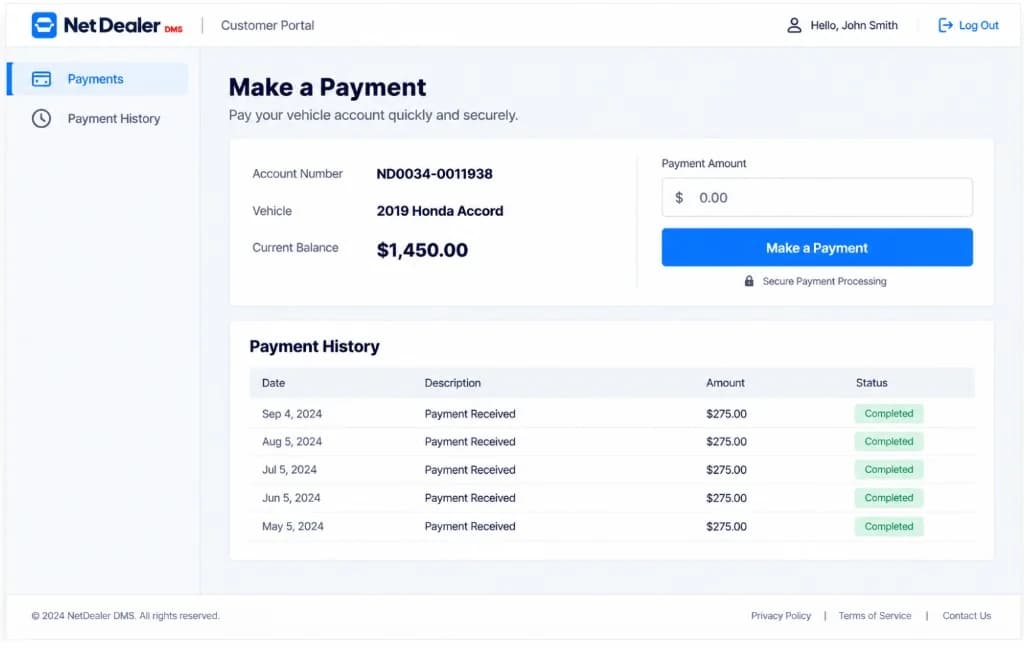
NetDealer customer portal using demo account data.
When customers can only call the office
BHPH stores spend the window on account questions the customer could see themselves if the portal used the same account the office posts to.
If customers cannot see account information, the office repeats the same lookup all day.
A payoff should come from the account — not from a callback when the right person is free.
When the store enables it, customers should pay against the same NetDealer account, not a disconnected link.
What customers can do
The portal is available when the dealership uses it for financed customers. It is not a public vehicle shopping site.
Customers sign in to see the financed account the dealership already keeps in NetDealer.
What posted should be visible to the customer and to the office from the same history.
Customers can request a payoff quote from the portal instead of waiting on a callback for the number.
Customers can pay in the portal or through a payment link. The dealership can still post payments in NetDealer.
Around the portal
Customer-facing
Dealers keep using the web app and mobile app to run the store. Customers use the portal only for their account.
Next step
A demo can walk account information, history and payoff quotes. Get Started is for stores ready to subscribe.
Prefer to talk now? Call (682) 708-9644.
Why BHPH stores turn the portal on
Account information, history and payoff quotes belong on the same file the office uses when they post a payment.
The portal is not a second books product. It is a customer view of the NetDealer account.
Online payments are available when the dealership enables them. The store can still take payments in NetDealer.
Staff still use the DMS. Customers do not get dealership inventory or other accounts.
Related
Closely related NetDealer pages — not a dump of every URL on the site.
It is a login for financed customers to review account information, payment history and payoff quotes. When the dealership enables online payments, they can also pay in the portal or through a payment link.
The portal is for stores that finance customers and turn it on. Independent retail-only stores may not need it.
Yes, when the dealership enables online payments. Customers can pay in the portal or through a payment link the store sends. The dealership can still post payments in NetDealer.
No. The portal is customer-facing. Dealers use the NetDealer web application and mobile app to run the store.
Account information, payment history and payoff quotes — with online pay when the dealership enables it.
Questions? (682) 708-9644 · contactus@netdealerdms.com