
Dealer management systems
What Is a Dealer Management System?
A plain-language explanation of what a DMS does, why independent used-car dealers use one, and how inventory, deals, customers, payments and collections connect.
app.netdealerdms.com/dashboard
In this article
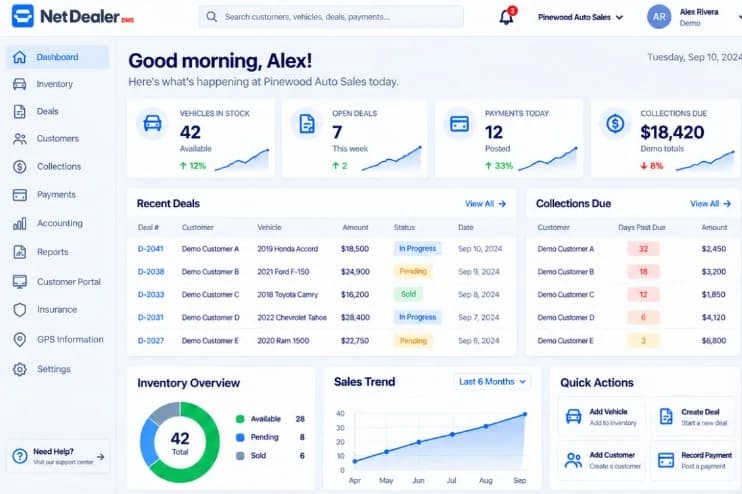
A dealer management system (DMS) is the software a car dealership uses to run the store: inventory, deals, customers, payments, collections and reporting. It is not a customer-facing car website, and it is not a generic CRM with a vehicle field taped on.
Independent lots feel the gap first. When the vehicle lives in a spreadsheet, the buyer lives in a folder, and the money lives in a cash log, anyone answering a simple question has to reconstruct the file. A DMS exists so that work happens on one record.
What a DMS usually covers
The exact screens differ by product. The jobs do not. A used-car dealer DMS is built around the loop the store already runs every day.
- Vehicle inventory, including VIN details and stock status
- Deals and contracts tied to the buyer and the unit
- Customer files the office and the lot can both find
- Payments posted to the right account, with history and receipts
- Collections on BHPH accounts: who owes what and what is due
- Reporting that starts from the same records, not an export first
Why independent dealers need one
Franchise groups often buy large enterprise suites. Independent dealers need the operational core without unused modules. The store is usually a small team wearing every hat. Re-keying a vehicle from the lot list into the deal worksheet is not a process. It is how mistakes get into the contract.
A DMS for independent dealers should be usable from a browser in the office and from a phone on the lot. See independent dealer DMS and mobile access. If the software only works at a desk, people invent side lists.
What changes when the store is BHPH
Buy Here Pay Here adds a second life after the deal: the account. Payment schedules, balances, history, late fees, insurance tracking and GPS-related account information belong with the customer the store financed. If collections works from a different file than the cashier, yesterday’s payment is already a rumor.
That is why BHPH dealer software is not a payment tracker beside the DMS. Collections and payments should sit on the same account as the deal.
DMS vs CRM
A CRM tracks people and conversations. A DMS tracks the dealership file: the vehicle, the contract, the money and, for BHPH, the account. Many stores need both kinds of discipline. Replacing a DMS with a CRM usually means the inventory and the contract still live somewhere else.
How to choose a DMS for an independent store
- Can you add a vehicle once, decode the VIN, and carry it into the deal?
- Can sales and the office see the same stock status?
- If you finance customers, do accounts, payments and collections stay in the same product?
- Can the team open it from the web and a phone — not only a desktop install?
- What happens after you subscribe: is the dealership set up by the vendor’s team?
For a longer checklist, published vendor pricing and a side-by-side look at several products, see our guide to choosing a DMS for an independent car dealership. If you finance customers, the BHPH software buyer’s guide covers accounts, schedules and collections in more depth.
Price matters, but so does whether promotional terms are actually published and whether the product matches how independent lots work. Current NetDealer subscription terms live on the pricing page and are configuration-driven, not a guarantee that every future customer will have the same offer.
Where NetDealer fits
NetDealer is a dealer management system for independent and BHPH dealerships. Inventory, deals, customers, payments, collections and reporting run in one product, with web and mobile access. Financed customers can use the NetDealer customer portal to review account information, see payment history, request a payoff quote, and — when the dealership enables online payments — pay through the portal or a payment link.
After a website subscription is confirmed, the NetDealer team is notified and begins dealership setup. The environment is not created the second checkout finishes.
See the product
Look at a DMS built for independent stores.
If you want to see how NetDealer connects inventory, deals and BHPH accounts, book a demo or start a subscription.
Related NetDealer pages
Related articles
- Best DMS for Independent Car Dealers in 2026
A 2026 buying guide for independent used-car dealers: what to compare in a DMS, what it costs, questions to ask, and sourced vendor notes. Not a ranked list.
- Best BHPH Software for Dealers in 2026
How US Buy Here Pay Here dealers should compare BHPH software: accounts, collections, payments, insurance, cost, and what to ask in a demo. Not a ranked list.