
Receipts cannot find the account
A customer wants a reprint. If the receipt is not tied to the account, the office reconstructs it from memory and a drawer.
Early Access OfferEarly Access availability for new dealerships
Dealership payments
When a customer pays, the account has to move. NetDealer posts the payment against the right BHPH account, keeps history and receipts with that file, and gives collections a balance that matches the window.
This page is about customer payments inside the dealership. It is not the Authorize.Net checkout used to subscribe to the NetDealer website.
app.netdealerdms.com/payments
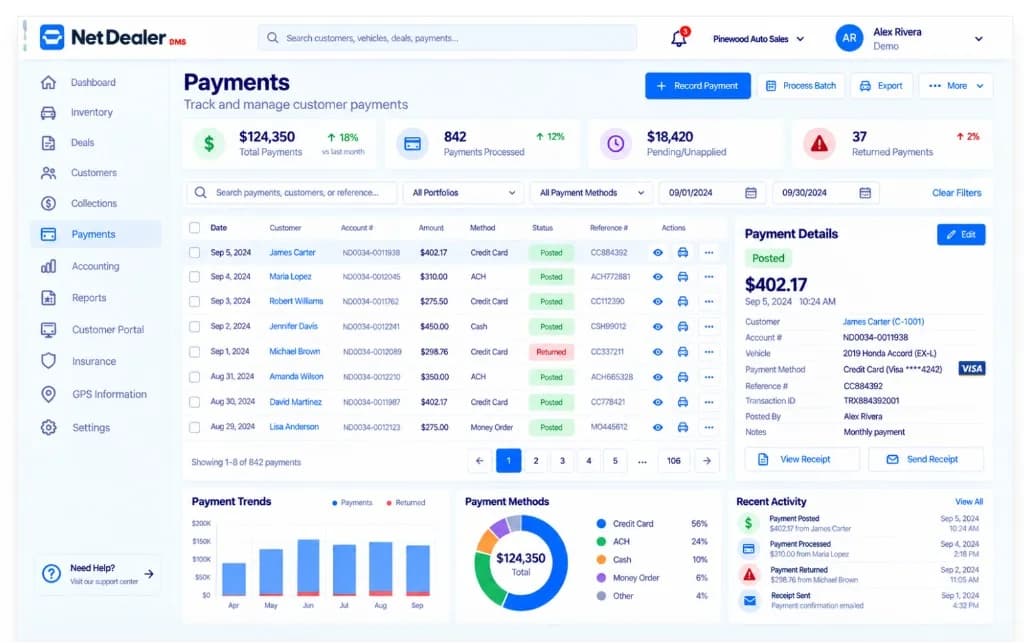
Payment history and take-payment workspace with demo amounts — not live customer transactions.
When payment tracking sits outside the account
If money is written down in one place and the account lives in another, balances are a nightly project instead of a field.
A customer wants a reprint. If the receipt is not tied to the account, the office reconstructs it from memory and a drawer.
The payment posted in a book. The due list did not hear about it.
Without history and the current balance together, every payoff is a special project.
How payments work in NetDealer
Dealer payment tracking in NetDealer is the link between the money that came in and the BHPH account collections will open next.
Record the payment against the financed account so the balance the office sees is the balance collections sees.
Keep history on the account and print or reprint receipts from the same record.
A posted payment should change what is due. That is the whole point of keeping payments in the DMS.
Customer account payments are dealership operations. NetDealer website subscriptions are processed separately through Authorize.Net hosted checkout.
Payments in the dealership loop
Office workflow
The web app is where most posting happens. The mobile app is for looking up the account when you are not at the window. We do not present desktop software on this site.
Next step
A demo can show receipts, history and balances. Use Get Started when you are ready to subscribe to NetDealer.
Prefer to talk now? Call (682) 708-9644.
Why dealers keep payments in the DMS
Payment management is not a separate product category for a BHPH lot. It is how the account stays honest.
The person asking “did they pay?” should open the account, not a shared inbox.
A due list that ignores today’s receipts creates avoidable conflict with customers.
How you pay for NetDealer is not how your customers pay you. Mixing those stories in marketing is how dealers get the wrong page.
Related
Closely related NetDealer pages — not a dump of every URL on the site.
Collections
The queue that should match posted payments.
BHPH software
Accounts, schedules and payoffs.
Independent dealer DMS
The rest of the store around payments.
Customer portal
Account information and payoff quotes for financed customers.
NetDealer pricing
Website subscription terms — not customer payments.
It is the part of a DMS that records customer payments on dealership accounts, keeps history and receipts, and updates balances used by collections. For BHPH dealers, that usually means in-house finance accounts.
Yes. Payments belong on the same account collections works from, so a posted payment should change what is due.
Yes. Receipts stay with the payment record on the account so the office can print or reprint from the same file.
No. This page is customer payment tracking inside the dealership. Subscribing to NetDealer uses Authorize.Net hosted checkout on the Get Started flow.
Yes, when the dealership turns on online payments. Customers can pay in the NetDealer customer portal or through a payment link the store sends. The dealership can still post payments in NetDealer.
History, receipts and balances should not live in a cash log beside the DMS.
Questions? (682) 708-9644 · contactus@netdealerdms.com