
Inventory is a different list than the lot
Aging and availability only mean something if they use the same stock record sales already sees.
Early Access OfferEarly Access availability for new dealerships
Reports & analytics
Reports only help if they use the same inventory, deals and accounts the store already runs. NetDealer keeps those views in the DMS so managers are not exporting to a spreadsheet to find out what happened today.
Review inventory, sales and collections from the same dealership records — not a separate analytics product.
app.netdealerdms.com/reports-&-analytics
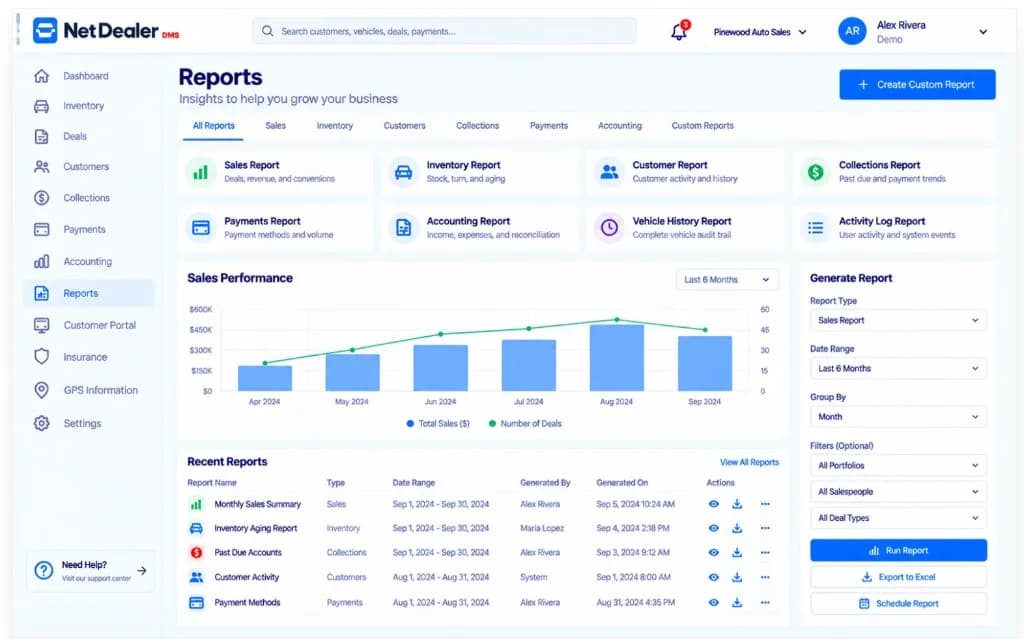
Demo report workspace with sample dealership metrics — not live store results.
When reporting is an export
Owners and managers should not rebuild inventory aging, daily sales or collections snapshots from files that drifted away from the DMS.
Aging and availability only mean something if they use the same stock record sales already sees.
Daily activity should come from deals in the DMS, not from whoever remembered to update a tracker.
BHPH reporting has to match posted payments and account balances, or the store calls the wrong people.
Reports in NetDealer
This is dealership reporting inside the DMS — not a business-intelligence platform, and not a promise of custom report builders or scheduled email packs.
See what you have, what moved and what is aging from the same inventory the deal uses.
Look at deals in the same system that printed the contract, instead of reconstructing the day from folders.
BHPH due items and account status belong next to the payments that already posted.
Managers should not have to export before they can talk about the store.
What the reports are about
For owners and managers
Reporting is part of the NetDealer web application. Mobile access is for looking up the underlying inventory, accounts and deals — not a second analytics app.
Next step
A demo can walk the report workspace with demo metrics. Get Started begins a subscription when the store is ready.
Prefer to talk now? Call (682) 708-9644.
Why dealers keep reporting in the DMS
A report that does not use the live dealership file is just another spreadsheet.
Inventory, sales and collections views should not require a nightly export to be true.
Aging, sales activity and due accounts — not unused franchise dashboards.
We do not market AI insights, live scorecards, or a custom report studio on this page.
Related
Closely related NetDealer pages — not a dump of every URL on the site.
Operational views of inventory, sales and collections inside the DMS, using the same records the store already runs. This page does not advertise a separate analytics product.
The point of keeping reporting in the DMS is to review inventory, sales and collections without exporting first to start the conversation.
No. NetDealer reporting is dealership operational reporting — not a BI platform, and not an AI insights product.
You can look up inventory, accounts and deals in the mobile app. Heavier reporting stays in the web application.
Inventory, deals and collections should not have to be exported before anyone can talk about the day.
Questions? (682) 708-9644 · contactus@netdealerdms.com